Share



Published on 20 July, 2026
| Last Updated on 20 July, 2026
Picture this. A customer clicks “Place Order” on your store. Behind that single click, your server has to charge their card, send a confirmation email, generate a PDF invoice, ping your warehouse, update inventory, and fire off a webhook to your analytics tool.
If you run all of that inside one HTTP request, the customer sits and watches a spinner for eight seconds. Worse, if the email service hiccups halfway through, the whole request throws an error, and now you have a charged card with no confirmation.
That is the exact wall almost every growing app slams into. And it is the precise problem Redis and BullMQ background jobs were built to solve.
In this guide, you will learn what background jobs are, how Redis and BullMQ work together, and how to wire up a production-ready queue in Node.js with real code you can copy today. No fluff, just the architecture that actually scales.
A background job is any task your app runs outside the normal request and response cycle. Instead of making the user wait for slow work to finish, you push that work to a queue and deal with it separately.
Think of it like a restaurant. When you order food, the waiter does not stand at your table cooking the meal. They take your order, hand it to the kitchen, and go serve other tables. The kitchen handles the cooking on its own schedule.
Your API is the waiter. The queue is the order ticket. The kitchen is your pool of workers. This separation is the heart of asynchronous job processing.
Here is the flow in four steps:
The user gets a snappy response. The heavy lifting happens quietly behind the scenes. That is the whole idea behind Node.js background jobs.
💡 Tip: A good rule of thumb: if a task does not need to finish before the user sees a response, it belongs in a queue. Emails, file uploads, report generation, and third-party API calls are all prime candidates.
Redis (short for Remote Dictionary Server) is an open-source, in-memory data store. Because it keeps data in RAM instead of on disk, it is absurdly fast, capable of handling millions of operations per second with sub-millisecond latency.
A lot of developers first meet Redis as “that caching thing.” But it does far more than cache. It works as a database, a message broker, and a streaming engine, and it powers a huge slice of the real-time internet.
Here is what makes Redis a great fit for job queues:
In short, Redis is the fast, reliable engine that sits underneath your queue. BullMQ is the friendly library that drives it.
✅ Best Practice: Use Redis 8 for queue workloads. It is the current release, it runs faster than Redis 7, and it returned to a true open-source license (AGPLv3) in 2025 after a period when newer 7.x builds were source-available only. Turn on AOF persistence (appendonly yes) so queued jobs survive a restart.
BullMQ is a Node.js job and message queue library built on top of Redis. It is the modern, TypeScript-first successor to the original Bull library, with a cleaner API, better performance, and a richer feature set.
If Redis is the engine, BullMQ is the steering wheel, dashboard, and cruise control. It hides the gritty Redis commands behind a simple, well-typed interface so you can focus on your actual jobs.
The library is built around a handful of clear concepts:
If you’re building modern, scalable applications that rely on robust backend architecture, learn more about https://www.rlogical.com/full-stack-development
Plenty of queue libraries exist, so why does BullMQ keep winning? Here is how the popular options stack up.
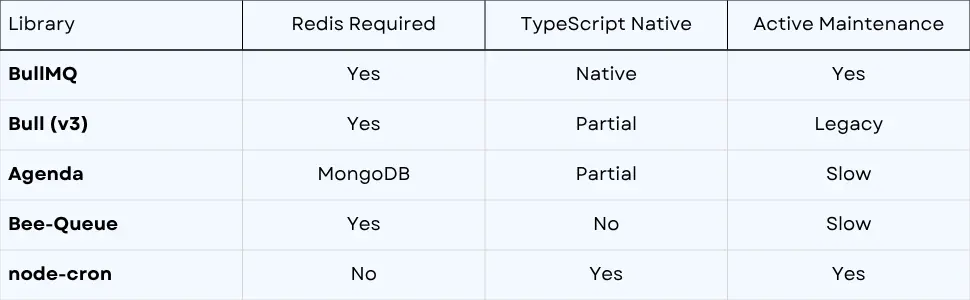
The takeaway is simple. On the axes that matter for production, native TypeScript support, active maintenance, tight Redis integration, and full-featured job processing, BullMQ comes out ahead.
The BullMQ vs Bull question deserves a special note. Bull v3 still works, but it is in legacy maintenance mode. BullMQ was rewritten from the ground up with a better internal design and first-class TypeScript types. For any new project, BullMQ is the clear pick.
💡 Tip: node-cron is great for a simple timer inside a single process, but it has no Redis backing, no retries, and no persistence. The moment you need reliability across restarts or multiple servers, you have outgrown it.
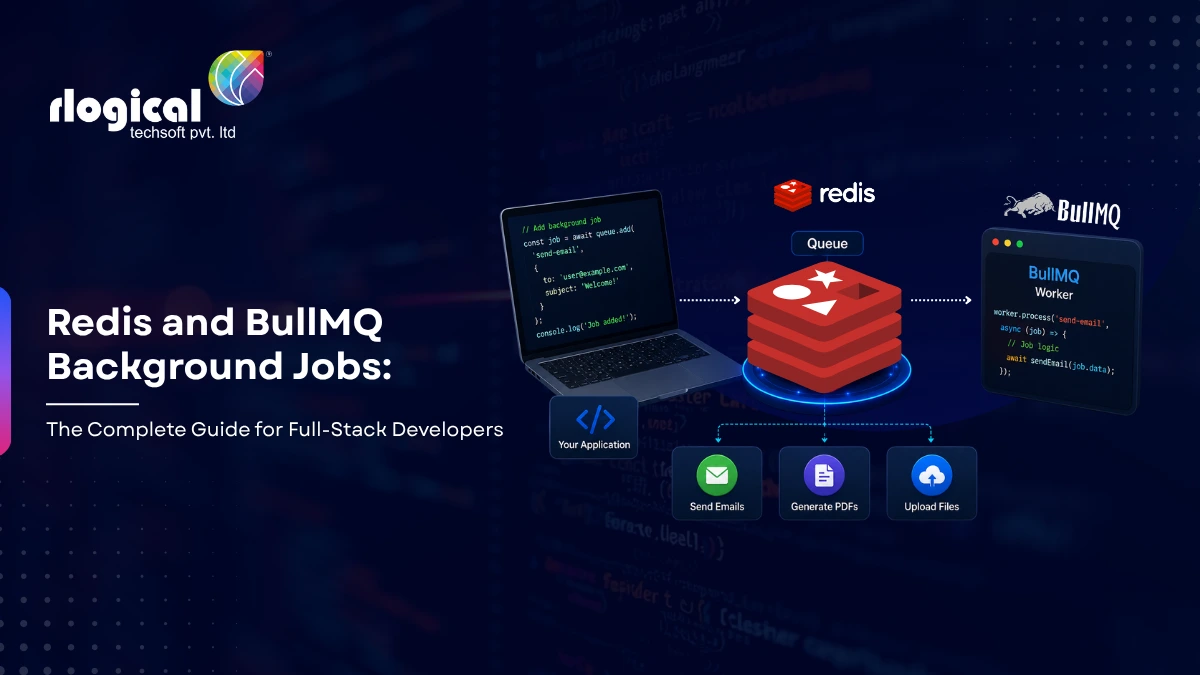
The whole design rests on one principle: separate request handling from job execution. Your web server stays fast and responsive while a separate fleet of workers chews through the heavy work.
Here is the shape of a typical setup:

Walk through what happens:
The beauty here is that the API and the workers are decoupled. You can deploy them separately, scale them independently, and restart one without taking down the other. If traffic spikes, you spin up more workers. If a worker crashes mid-job, BullMQ hands that job to another worker and retries it.
This is the architecture that lets small teams run big workloads without their servers falling over.
Background jobs are not a niche trick. They show up in nearly every serious application. Here are the patterns you will reach for again and again.
When an order comes in, you need to charge the payment, send confirmation emails, notify the warehouse, update inventory, generate an invoice, and award loyalty points. Queue all of it instantly and return a fast response. The customer sees “Order confirmed” in a flash while the rest runs in the background.
Services like Stripe, Slack, and GitHub fire thousands of webhooks per minute. The trick is to acknowledge each one instantly with a 200 OK, then push the actual processing into a queue. This way you never miss a webhook, and you get full retry logic for free if a downstream step fails.
⚠️ Warning: Most webhook providers retry if you do not respond within a few seconds, and many will disable your endpoint after repeated timeouts. Always acknowledge fast and process in a queue, never inline.
Sending 50,000 marketing emails through one request is impossible. With a queue, you add 50,000 jobs and let a rate-limited worker drip them out at a pace your email provider allows. Bounced messages retry automatically, and you stay well under your API limits.
Image and video work is heavy. Resize a photo into five sizes, compress it, upload each version to S3, then update the database. None of that should block the user who just hit “Upload.” Queue it, return immediately, and let workers handle the grind.
Some work runs on the clock, not on a request. Generate a daily sales report at midnight, send a weekly digest every Monday morning, or sync data every fifteen minutes. BullMQ’s job schedulers handle all of this with cron expressions.
If a third-party API caps you at ten requests per second, blasting it will earn you a stream of 429 errors. BullMQ’s built-in rate limiter paces your jobs so you stay inside the limit and never get throttled.
Time to build. We will set up Redis, install BullMQ, and create a queue, a producer, and a worker. Every snippet here uses the current BullMQ API, so you can drop it straight into a project.
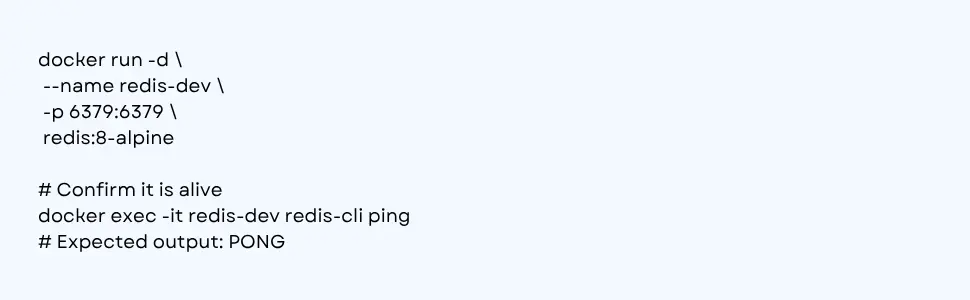
The fastest way to get Redis locally is Docker, which keeps your machine clean and matches production more closely.
Using Docker (recommended for development):
On macOS with Homebrew, if you prefer a native install:

For a full-stack project, a docker-compose.yml keeps everything reproducible:
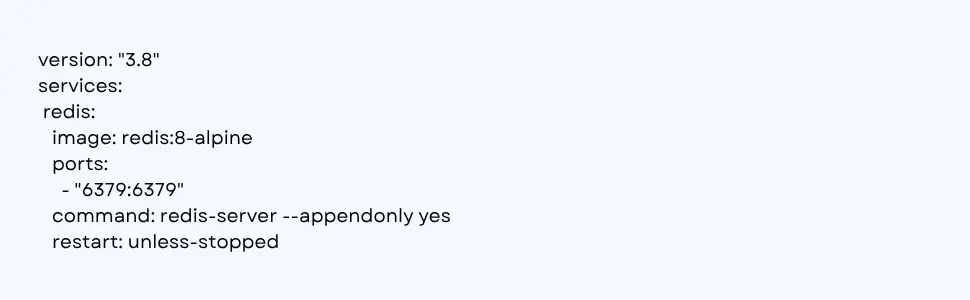
Inside your Node.js project, install BullMQ along with ioredis.
npm install bullmq ioredis
💡 Tip: BullMQ uses ioredis under the hood, so install both packages together. This keeps your dependency tree predictable and avoids version mismatches.
This is the single most important setup detail. Always reuse one shared Redis connection across all your queues. Spinning up a new connection per queue wastes resources and can exhaust your Redis connection limit fast.
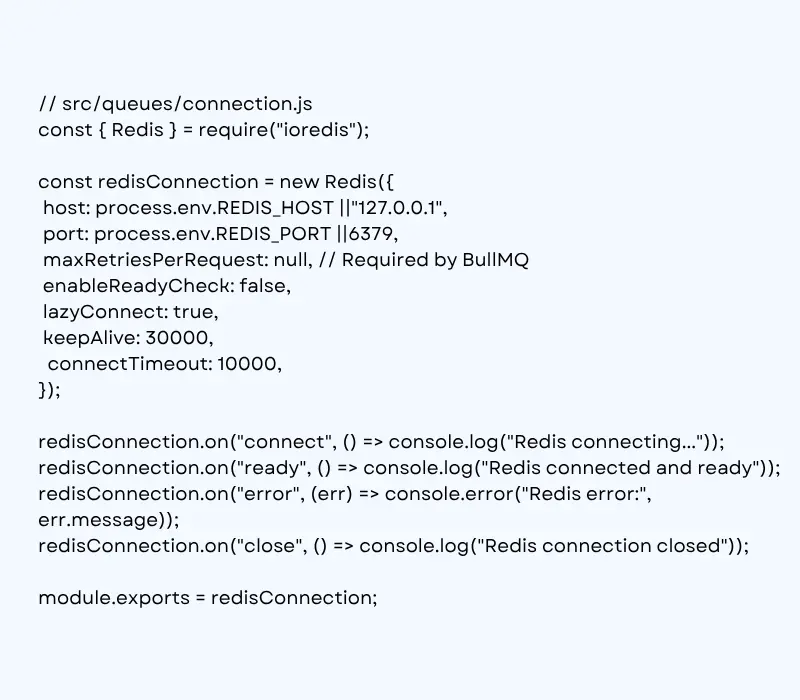
Why maxRetriesPerRequest: null? BullMQ requires it. Without that setting, ioredis throws errors when it retries commands during a reconnect. Set it once here and forget about it.
A queue is where jobs live. When you define one, you also set the default behavior for retries, backoff, and cleanup.
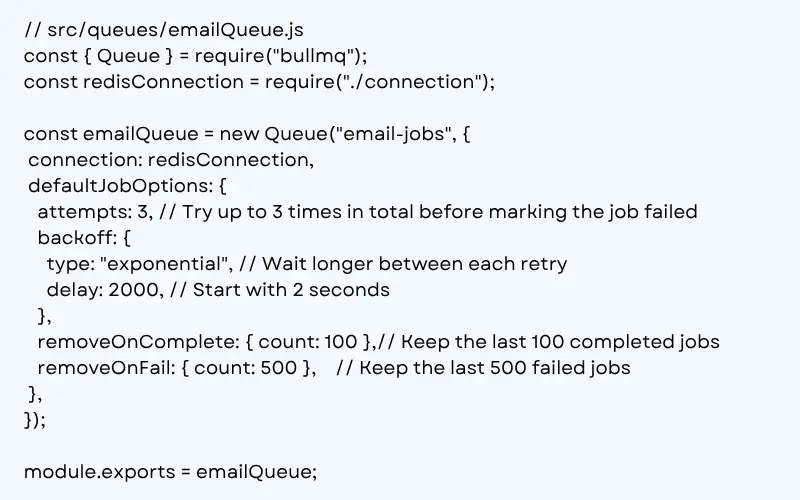
Notice how much reliability you get from a few lines. Every job added to this queue is attempted up to three times in total, with a growing delay between tries, and old jobs clean themselves up so Redis memory stays under control.
The producer is whatever code adds jobs to the queue. In a typical app, that is your API controller. It saves what it must save, queues the slow work, and returns instantly.
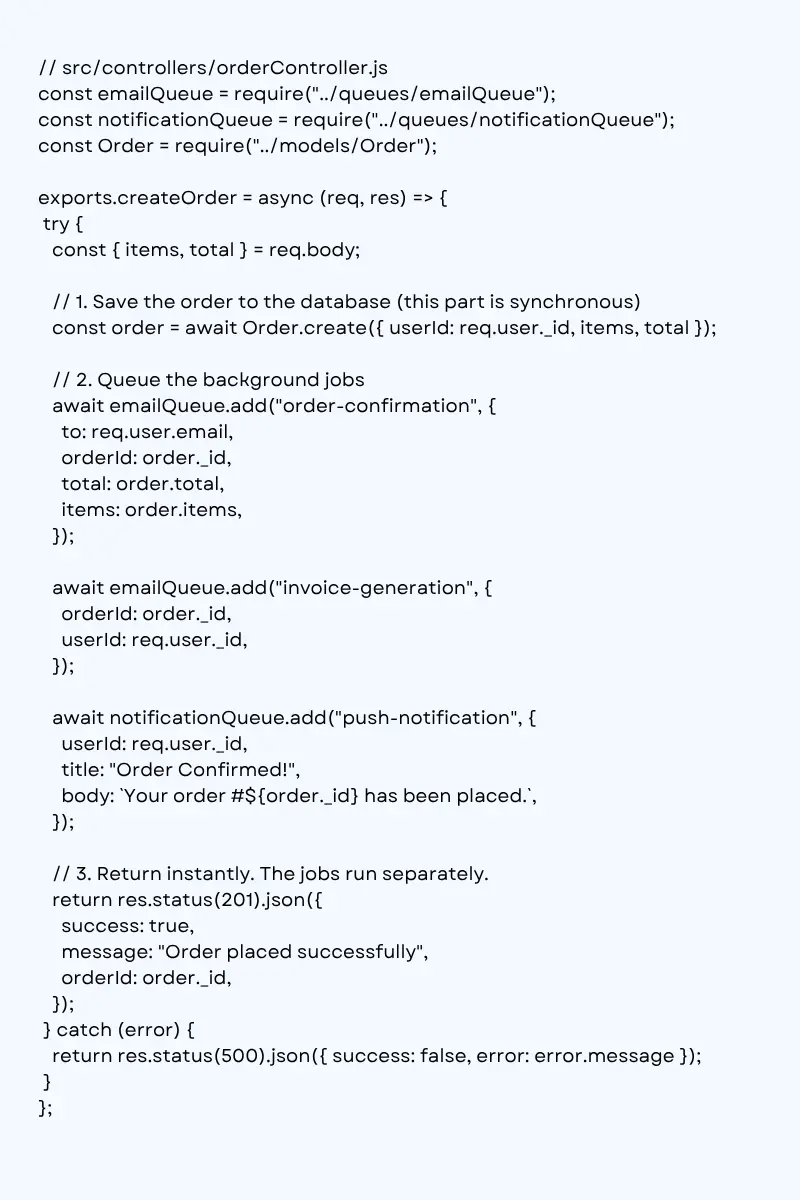
The user gets their confirmation in milliseconds. The emails, invoice, and push notification all happen afterward, on their own time.
A worker pulls jobs off the queue and runs them. Run your workers in a separate process from your API so a heavy job never slows down your web server.
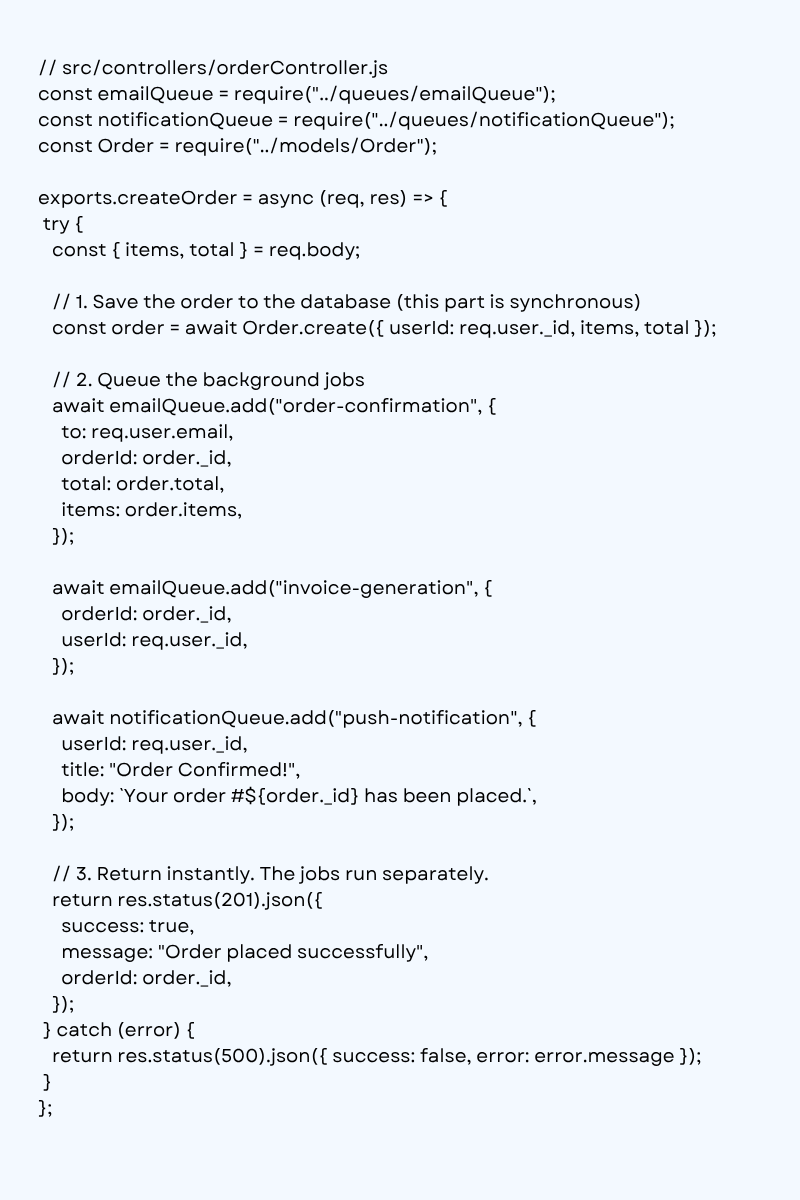
That is a complete, working pipeline. An API that queues jobs and a worker that runs them, both sharing one Redis connection.
For recurring work, use a job scheduler. The modern BullMQ method is upsertJobScheduler, which replaced the older repeat option.

You can also schedule by interval instead of cron, for example { every: 900000 } to run every fifteen minutes.
⚠️ Warning: If you used the old queue.add(name, data, { repeat }) API, note that it was deprecated in BullMQ v5.16.0 in favor of job schedulers. Migrate to upsertJobScheduler for the cleaner, more reliable behavior.
To stay inside an external API’s limits, add a limiter to the worker options.
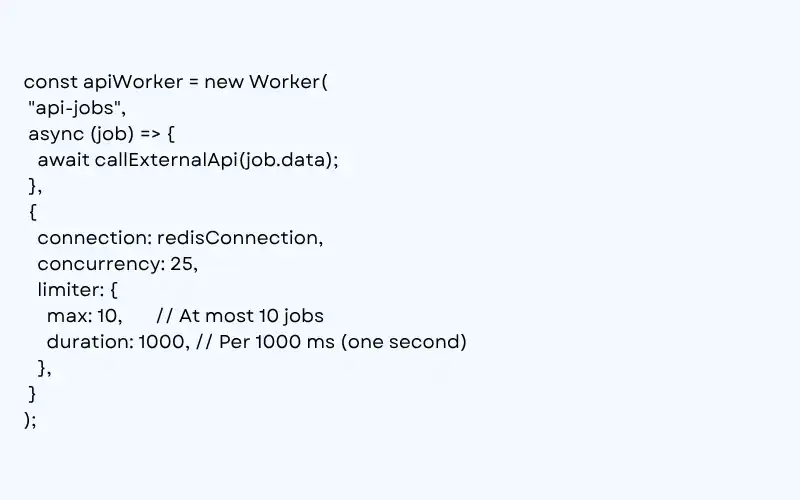
This worker will never run more than ten jobs per second, no matter how many sit waiting in the queue.
Need a password-reset email to jump ahead of a marketing blast? Set a priority. Lower numbers run first.

For workflows where a parent job depends on several child jobs finishing first, reach for a Flow Producer.
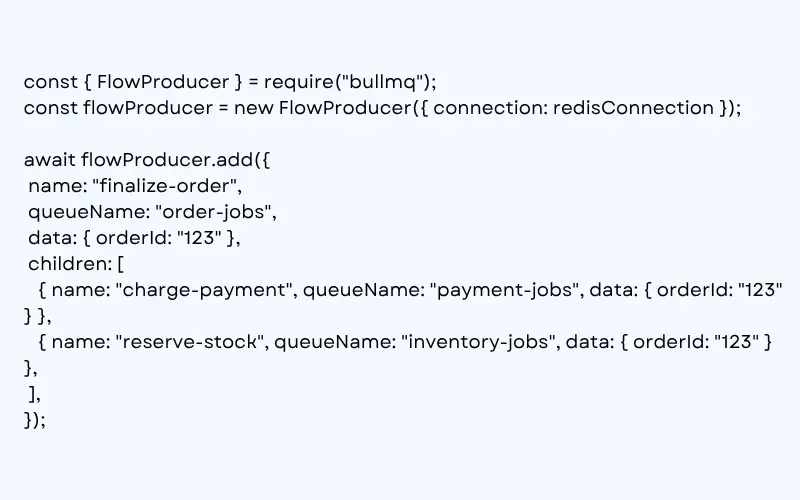
The finalize-order job only runs after both charge-payment and reserve-stock complete. That is parent and child orchestration without a single line of glue code.
Getting a queue working in development is easy. Keeping it healthy in production takes a little discipline. Here is what separates a hobby setup from a system you can trust.
Failures happen. A flaky network, a rate-limited API, a brief database blip. Set sensible retries with exponential backoff so transient errors recover on their own instead of paging you at 3 a.m.

With a one-second base delay, the wait doubles on each retry: one second, then two, then four, then eight, and so on. The formula BullMQ uses is 2^(attempts – 1) times the delay. That spacing gives a struggling service room to recover instead of getting hammered. Keep in mind that attempts counts total tries, so attempts: 5 means the first run plus four retries.
Without cleanup, Redis fills with finished jobs until it runs out of memory. Always cap how many jobs you keep using removeOnComplete and removeOnFail. Keep a small window of completed jobs for visibility and a larger window of failed jobs for debugging.
✅ Best Practice: Keep failed jobs longer than completed ones. The successes are noise once they are done, but the failures are your best clue when something breaks.
You cannot fix what you cannot see. Add a dashboard so you can watch jobs flow, spot backups, and inspect failures. Bull Board is a popular open-source UI that plugs straight into BullMQ. For larger teams, Taskforce.sh offers a hosted option.
Pair the dashboard with event listeners on completed and failed so you log every outcome and can alert on spikes.
Any worker that calls an external service should have a limiter. It protects you from 429 errors, protects the other service from your traffic, and keeps your integration in good standing.
Run workers in their own Node processes, not inside your web server. This keeps a CPU-heavy job from blocking incoming requests and lets you scale workers and API servers independently.
💡 Tip: A simple scaling model is one container for your API and a separate container (or several) for your workers. When the queue backs up, add more worker containers. Your API stays untouched.
Want to strengthen your development team with experienced full-stack engineers? Visit https://www.rlogical.com/hire-full-stack-developer/
Even experienced developers trip over the same handful of issues. Sidestep these and you will save yourself a lot of debugging.
Creating a new Redis connection per queue. This quietly exhausts your connection pool. Share one connection, as shown earlier.
Forgetting maxRetriesPerRequest: null. Leave it off and ioredis throws confusing errors during reconnects. It is a hard requirement for BullMQ.
Running workers inside the web server. A heavy job will block your event loop and tank your response times. Keep workers in their own process.
Skipping job cleanup. No removeOnComplete means Redis memory grows forever until it crashes. Always set retention limits.
Putting huge payloads in a job. Jobs live in Redis memory, so do not stuff a 10 MB file into job.data. Store the file in S3 and pass a reference, like a key or URL, instead.
Assuming jobs run exactly once. Design your job handlers to be idempotent, meaning safe to run twice. If a worker dies after doing the work but before marking the job complete, BullMQ may retry it. Guard against double charges and duplicate emails.
⚠️ Warning: Idempotency is the single most overlooked detail in queue systems. Before you charge a card or send money, check whether that action already happened for this job. A unique key per operation makes this easy.
Ignoring failed jobs. A growing failed-jobs pile is a signal, not a nuisance. Watch it. It usually means a downstream service is broken or a bug is lurking in a handler.
BullMQ is excellent, but it is not the answer to every problem. Reaching for it in the wrong situation just adds complexity. Skip it when:
The honest rule is this. Use BullMQ when you have slow or unreliable work that should not block the user and needs to run reliably. For everything else, choose the simplest tool that does the job.
Redis and BullMQ background jobs turn a fragile, slow request into a fast response backed by reliable, scalable processing. It is one of the highest-leverage upgrades you can make to a growing Node.js backend.
They are a way to run slow tasks outside the main request. Your app drops a task into a Redis-backed queue and responds to the user immediately, while a separate BullMQ worker runs the task in the background with automatic retries.
Yes. BullMQ is built on top of Redis and uses it to store and manage the queue. You can run Redis locally with Docker in seconds, or use a managed Redis service in production.
Bull (v3) is the older library and is now in legacy maintenance. BullMQ is the rewrite with native TypeScript support, a cleaner API, better performance, and active development. For any new project, choose BullMQ.
BullMQ retries failed jobs automatically based on the attempts and backoff settings you define. Jobs that fail every attempt move to a failed state, where you can inspect them, debug the cause, and retry them manually if needed.
No. Run workers in a separate process from your web server. This stops a heavy job from blocking incoming requests and lets you scale your workers and your API independently.
Have questions about implementing Redis, BullMQ, or scalable Node.js solutions? Contact our team at https://www.rlogical.com/contact/
Rahul Panchal is a visionary technology entrepreneur and the Founder & Managing Director of Rlogical Techsoft Pvt. Ltd. Passionate about the power of Artificial Intelligence, he focuses on helping businesses transform through AI-driven solutions, intelligent automation, and data-centric digital ecosystems. Alongside AI, his expertise spans scalable web and mobile platforms, Cloud, IoT, and modern enterprise technologies enabling organizations to innovate faster, optimize operations, and build future-ready digital products with real business impact.
Global insights on technology trends, best practices, and digital transformation strategies.

A proven track record of high-impact deliveries across industries and technologies
Share with us. We'll assess its feasibility, suggest the right tech stack, and share a clear cost & timeline.
Years of Experience
Projects
Countries
Engineers
Verified Client Reviews
Industry Served