Share



Published on 21 September, 2026
| Last Updated on 21 September, 2026
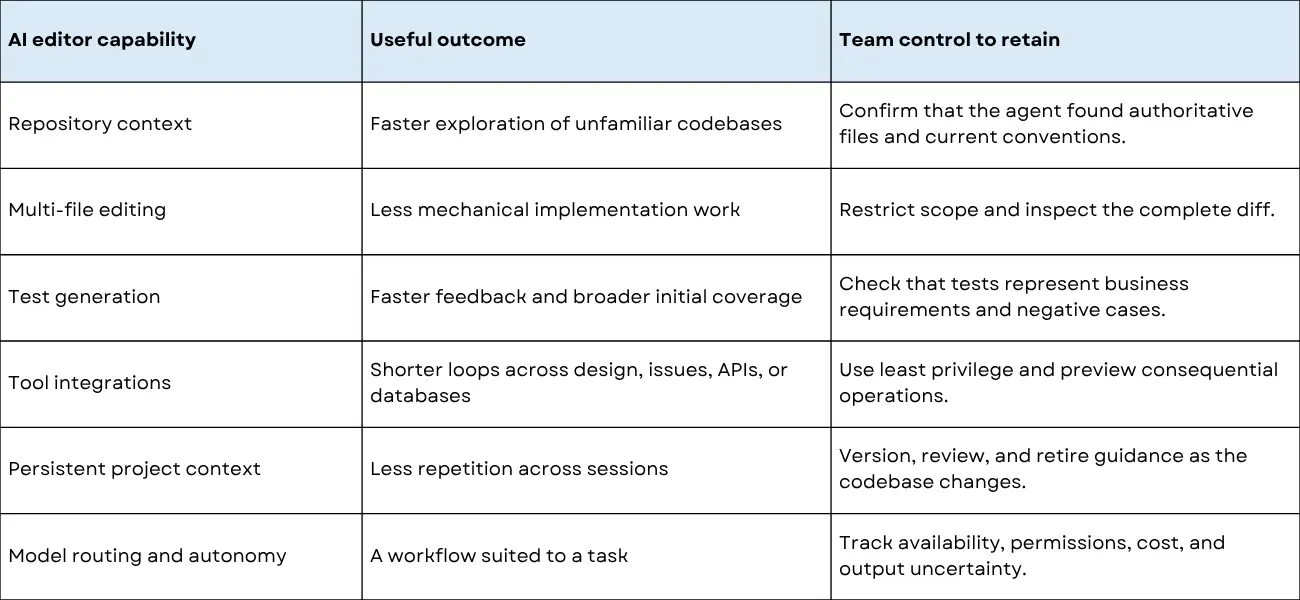
AI code editors can inspect repositories, modify multiple files, run tests, and use connected tools. That capability makes implementation faster in some contexts, but it also increases the number of engineering decisions an agent may make before a human has agreed on what “done” means.
Spec-Driven Development (SDD) helps address this problem by converting an outcome into reviewed requirements, a technical design, and bounded implementation tasks. Kiro documents this workflow through requirements.md, design.md, and tasks.md artifacts.[1] These artifacts improve traceability, but they do not guarantee secure or correct software. Teams must still review the requirements, control agent permissions, and independently verify the output.
For more information about Rlogical and its technology solutions, visit the https://www.rlogical.com/.
An AI code editor combines an integrated development environment with a model-mediated coding agent. Depending on the product and surface, the agent may inspect repository files, edit multiple files, execute commands, generate tests, and call external tools. Kiro describes its system as a unified harness that coordinates conversation, context, permissions, tools, and model-provider calls across its IDE, CLI, Web, and Mobile surfaces.[5]
Every additional capability expands the agent’s decision surface. A completion system suggests a line. An agent can select a file, infer an architecture, install a dependency, execute a command, and decide that a test is sufficient. The engineering question therefore becomes: what may the agent decide, with what evidence, and under whose approval?
Evidence also argues against a universal claim that AI automatically speeds up software delivery. In a 2025 METR randomized study, 16 experienced open-source developers worked on 246 real issues in repositories they knew well. AI-allowed work took 19% longer in that study.[6] METR later marked those results as out of date because newer AI tools may behave differently. The result should therefore be treated as historical evidence from one setting, not a general productivity law. Stack Overflow’s 2025 survey provides a different signal: 46% of respondents actively distrusted the accuracy of AI-tool output, compared with 33% who trusted it.[7]
For businesses looking to build reliable AI-powered solutions, experienced AI/ML developers can help turn these technologies into production-ready applications. Explore our https://www.rlogical.com/hire-ai-ml-developer/ to learn more.
A common mental model is:
Prompt → generated code → tests pass → feature complete
A safer production model is:
Outcome → explicit constraints → reviewed design → bounded implementation → independent verification
Compilation proves syntax and type compatibility. A passing test proves only what that test exercises. Neither necessarily proves correct authorization, tenant isolation, failure behavior, accessibility, performance, operational fit, or alignment with the product decision.
SDD helps address this gap by making more than the generated code reviewable. Requirements state the behavior and acceptance criteria. Design records system-level decisions. Tasks turn the design into bounded implementation steps.
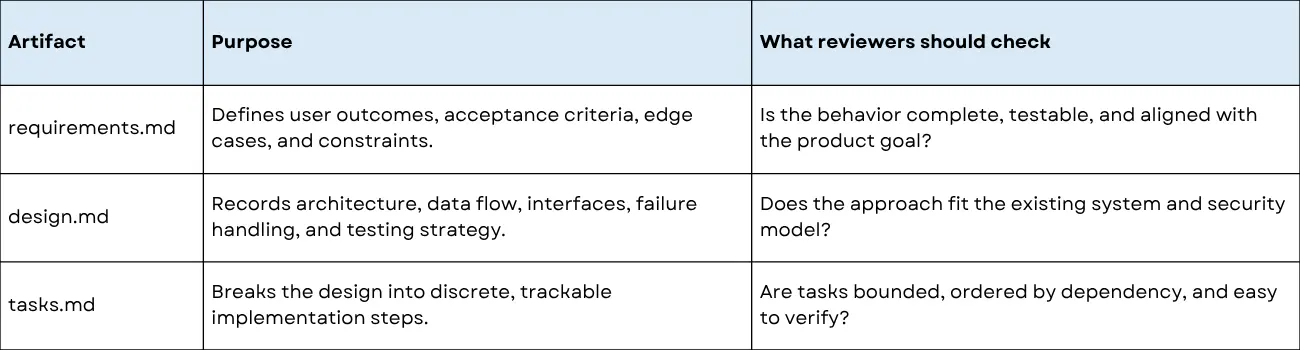
Kiro’s documentation describes Feature Specs, Bugfix Specs, and Quick Spec workflows. Standard workflows can move through requirements or bug analysis, design, and tasks, while Quick Spec can generate the artifacts without approval gates.[1][2] That distinction matters: a team should choose whether it wants review checkpoints or a faster draft based on the risk and maturity of the work.
Consider a SaaS application where users need reusable survey templates. The application uses server-side rendering, shared UI components, boundary validation, and multi-tenant authorization. A vague request such as “Build a templates gallery with filters” leaves too many security and behavior decisions implicit.
Prompts are temporary. Project conventions are meant to persist. Kiro steering files provide persistent project guidance through Markdown files. Workspace steering files reside under .kiro/steering/, and Kiro supports inclusion modes such as always, fileMatch, manual, and auto.[3]
Steering files are not automatically version-controlled. Teams should commit workspace steering files to the repository, review changes through normal pull requests, and remove rules that no longer reflect the system. Useful guidance can cover the technology stack, component patterns, API conventions, authentication rules, forbidden imports, testing practices, and data-handling requirements.
Kiro Powers package tools, workflows, skills, and knowledge so relevant context can be activated on demand.[4] This can reduce context overload and help an agent work with specialized technologies. It also creates a supply-chain and permission boundary.
OpenSSF and OWASP identify risks including indirect prompt injection, tool abuse, supply-chain vulnerabilities, data exfiltration, secret leakage, and missing access controls.[8][9] Security checks must run independently of an agent’s self-evaluation. A model can be asked to review its own code, but self-review is not an independent security control.
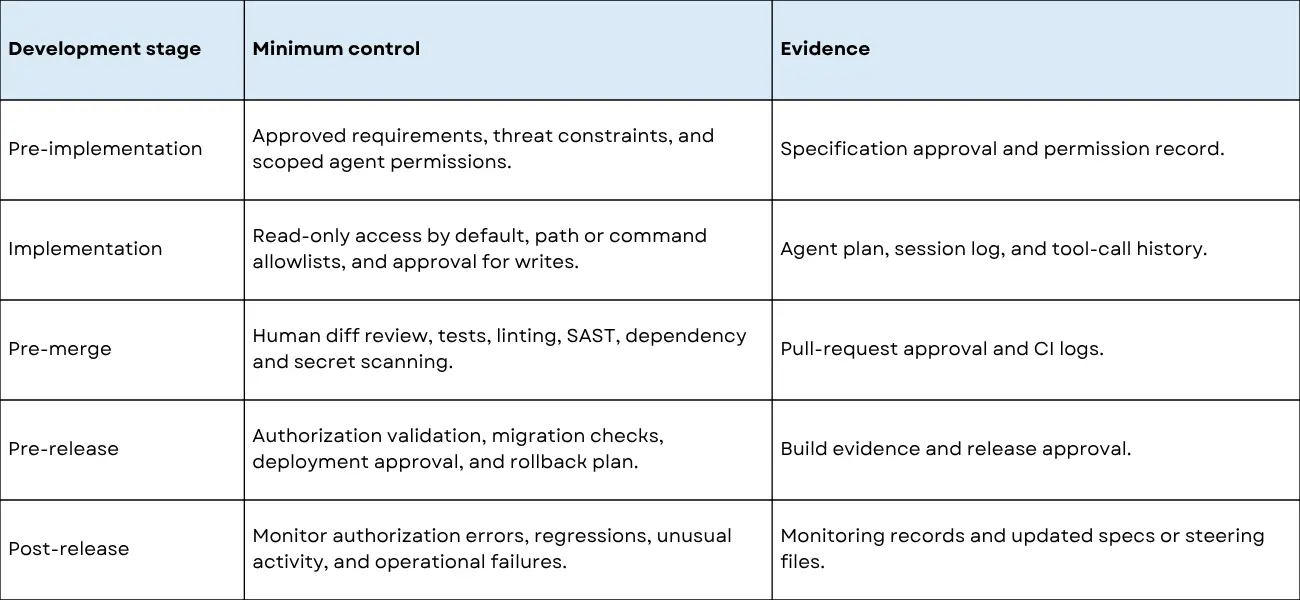
SDD does not guarantee that an agent will interpret requirements correctly or produce secure software. Specifications can be incomplete, outdated, overly detailed, or inconsistent with the running system. Generated tests can validate the implementation rather than the intended behavior. A detailed document can also slow development if it records low-value decisions that should remain flexible.
Treat specifications as maintained engineering artifacts. Review requirements with stakeholders, check designs against the existing architecture, and update the documents when implementation or user feedback changes the system. Use normal human review, automated tests, security scanning, dependency controls, and CI/CD gates regardless of how the code was produced.
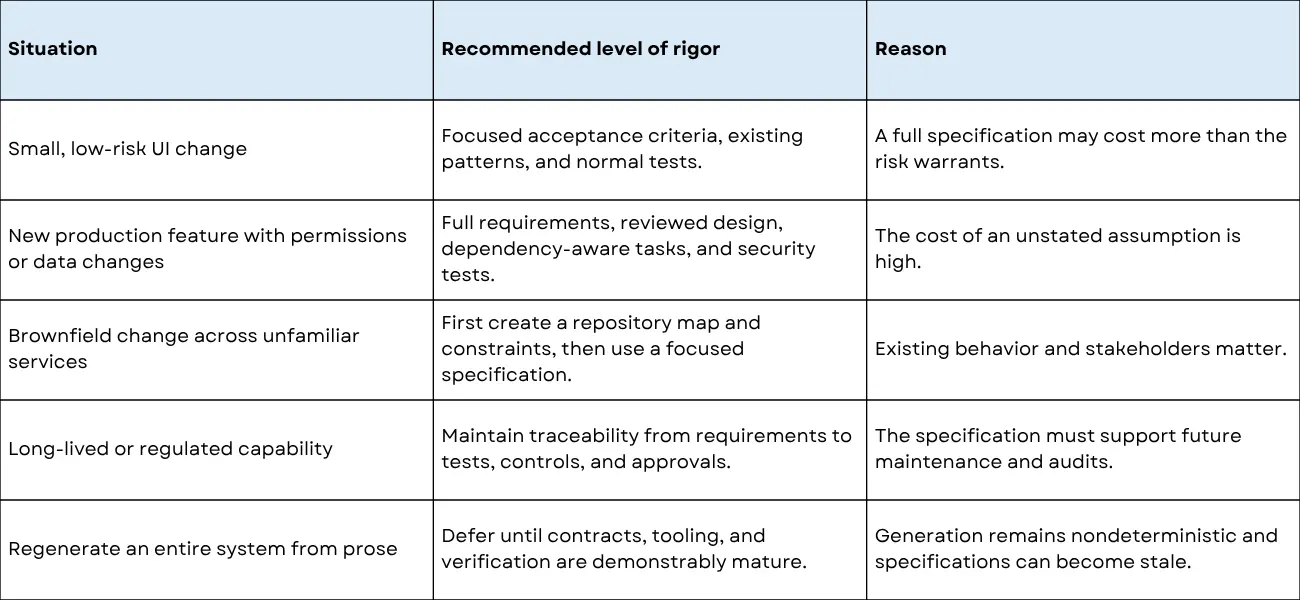
Define the outcome and non-goals. Identify authorization, privacy, failure, and operational constraints. Inspect the repository before proposing new patterns. Approve the design before implementation. Require negative tests and ordinary CI gates. Review external tools and their provenance. Measure review time, defect escape, rework, revert rate, and maintenance cost rather than celebrating generated lines of code.
Spec-driven development is an approach where developers define detailed software requirements, behaviors, constraints, and acceptance criteria before or alongside implementation. These specifications provide a clear reference for development, testing, and code review, helping teams maintain consistency throughout the software development lifecycle.
AI code editors can use project requirements, technical specifications, coding guidelines, and existing code context to assist developers with implementation. This can help translate defined specifications into code while keeping development aligned with the intended functionality and project architecture.
Combining AI code editors with spec-driven development can improve development consistency, reduce repetitive coding work, and provide clearer implementation guidance. Specifications also give developers a structured reference for reviewing AI-assisted code against the original requirements.
Yes. Many AI-assisted development environments can use natural-language requirements or structured specifications as context for generating or modifying code. Developers should still review the generated code, validate it against the specification, and run appropriate tests before integrating it into a production codebase.
Yes. A clear specification can provide AI coding tools with more precise context about expected functionality, constraints, and acceptance criteria. This can make AI-assisted development more predictable while keeping developers responsible for architectural decisions, validation, testing, and final code quality.
AI code editors deliver the most value when they make engineering decisions easier to expose, not when they hide architecture behind a large diff. Kiro’s specifications, steering files, and tool integrations show one documented way to organize that work. Independent evidence does not show that Kiro—or SDD in general—guarantees faster delivery or higher quality.
The durable practice is straightforward: document the behavior that matters, constrain context and tools, implement in bounded steps, and verify the result with people and systems independent of the generation step. Let an agent carry more of the mechanical load as evidence improves, but keep authority with the team that owns the product and its risks.
If you have questions about the services, solutions, or technology discussed here, you can contact the Rlogical team.
The best AI code editor is not the one that generates the most code. It is the one that makes the right code easier to specify, inspect, and prove.
Rahul Panchal is a visionary technology entrepreneur and the Founder & Managing Director of Rlogical Techsoft Pvt. Ltd. Passionate about the power of Artificial Intelligence, he focuses on helping businesses transform through AI-driven solutions, intelligent automation, and data-centric digital ecosystems. Alongside AI, his expertise spans scalable web and mobile platforms, Cloud, IoT, and modern enterprise technologies enabling organizations to innovate faster, optimize operations, and build future-ready digital products with real business impact.
Global insights on technology trends, best practices, and digital transformation strategies.
A proven track record of high-impact deliveries across industries and technologies
Share with us. We'll assess its feasibility, suggest the right tech stack, and share a clear cost & timeline.
Years of Experience
Projects
Countries
Engineers
Verified Client Reviews
Industry Served