Share



Published on 03 December, 2019
| Last Updated on 11 August, 2026
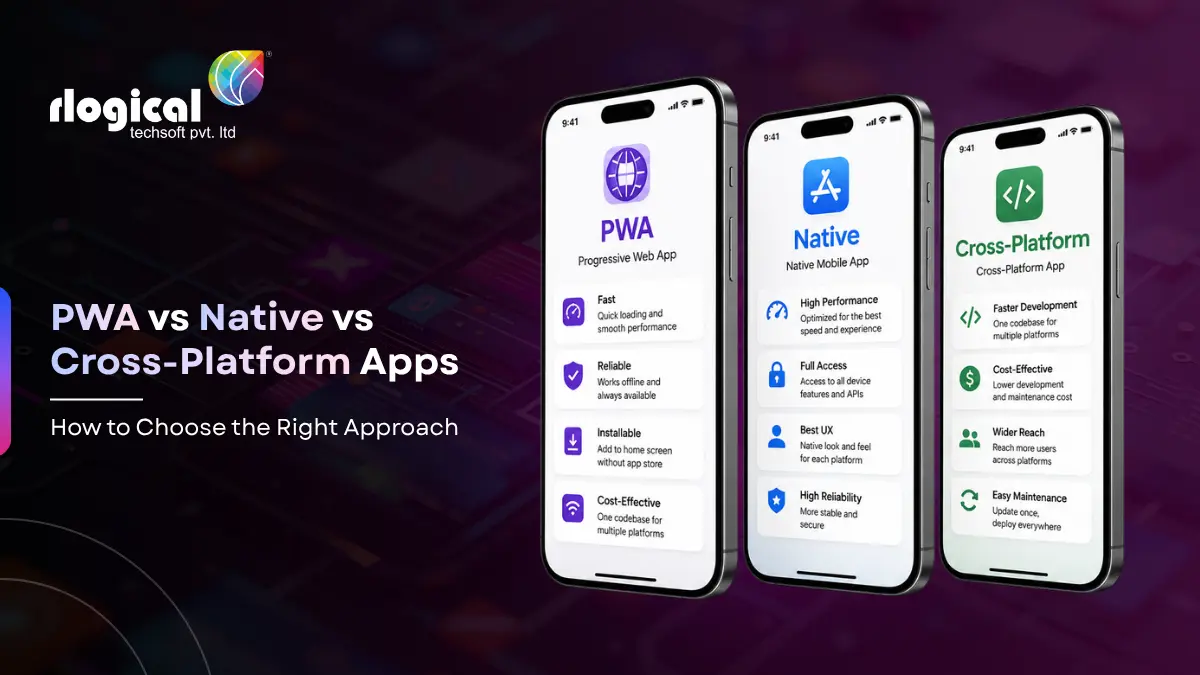
When this guide first appeared, the question every business asked was simple: build an HTML5 web app or a native app? That framing is now out of date. Browsers grew far more capable, two cross-platform frameworks matured into production tools, and HTML5 web apps evolved into Progressive Web Apps (PWAs). The real choice today sits between three options: a PWA, a native app, or a cross-platform app built with Flutter or React Native.
This guide compares all three across the factors that actually decide a project: performance, cost and time to market, user experience, SEO and discoverability, offline support, device and hardware access, and app store distribution. At the end you will find a plain checklist for when each option is the right call.
PWA (Progressive Web App). A website built with HTML, CSS, and JavaScript that behaves like an app. It runs in the browser, installs to the home screen without an app store, works offline through a service worker, and sends push notifications on most platforms. A PWA is the grown-up version of the old HTML5 mobile app.
Native app. Built for one operating system using its own tools and languages: Swift or SwiftUI for iOS, Kotlin for Android. It talks directly to the platform, so it has the deepest hardware access and the smoothest performance. The trade is that you build and maintain a separate codebase for each platform.
Cross-platform app. One codebase that compiles to both iOS and Android. The two dominant frameworks are Flutter (Dart, created by Google) and React Native (JavaScript, backed by Meta). You get most of the reach of native from a single project.
HTML5 mobile apps did not disappear. They turned into PWAs. The same web languages now have access to service workers, the Cache API, push notifications, the camera and microphone, geolocation, and home screen installation. If you are reading older articles that pit HTML5 against native, read “PWA” wherever they wrote “HTML5.” The capabilities are far ahead of where they were a few years ago, even if iOS still holds some of them back.
Native sets the ceiling. With direct platform access and no abstraction layer, a well-built native app is as fast as the device allows.
Cross-platform has closed most of the gap. React Native’s New Architecture, with the Fabric renderer, JSI, TurboModules, and the Hermes engine, removed the old JavaScript bridge that used to cause lag. Flutter renders every pixel through its own Impeller engine and compiles ahead of time to native code, holding steady frame rates on animation-heavy screens. For the large majority of business apps, users cannot tell a polished cross-platform app from a native one.
PWAs depend on the browser and the device. On capable Android browsers they feel close to native. On iPhone they run on WebKit, because every iOS browser uses WebKit underneath, which caps what is possible. Heavy graphics, complex animation, and gaming still favor native or Flutter.
Native is the most expensive route, because you fund two separate builds and two teams, then carry two codebases through every future update. That cost compounds over the life of the product.
Cross-platform usually cuts development cost by around 30 to 60 percent against separate native builds, since one codebase serves both platforms. The first release tends to arrive sooner too, which makes it a strong fit for an MVP.
A PWA is normally the cheapest path. You build one web app for every device and skip app store review cycles entirely. Industry estimates often place a PWA at a fraction of the cost of building and maintaining separate native apps.
Worth saying plainly: the price depends on scope, not just on the platform you pick. A simple catalog and a real-time marketplace sit at very different ends of the budget no matter how they are built. For a closer look, see our guide on how much it really costs to develop a mobile app.
Native gives the most platform-true feel. Controls, gestures, and transitions match exactly what users already expect on their phone, and new system design updates arrive on day one.
The two cross-platform frameworks take different routes to a similar result. React Native uses the platform’s real UI components, so screens look native by default. Flutter draws its own widgets, which gives pixel-perfect consistency across every device and full control over the look. The trade with Flutter is that it does not automatically pick up new system design changes until you update for them.
PWAs deliver a solid, responsive experience, but the install path on iPhone is manual: users open the Share menu and tap Add to Home Screen. There is no automatic install prompt on iOS, so installs are less discoverable than a single tap in the App Store, and a few app-like touches such as home screen widgets and deep system integration are missing.
This is where the PWA pulls ahead. A PWA is a website, so every page can be crawled, indexed, and shared by URL. It appears in Google results and opens straight from a link with no install step in the way.
Native and cross-platform apps live inside the app stores. People find them through store search and App Store Optimization, not web search, and their content is generally not indexed by Google the way web pages are.
If reach through search and friction-free sharing matters, for example a content site, an online store, a publication, or anything where you want the front door to be a link, the web side of this decision carries real weight. Plenty of businesses run both: a PWA or website for reach, plus a native or cross-platform app for their most engaged users.
All three can work offline now, but the depth differs.
Native and cross-platform apps have full local storage and background processing. They can pre-fetch fresh data and sync in the background, so the screen is already up to date the moment the user opens the app.
PWAs cache the app shell and content with a service worker and the Cache API, so they load and run without a connection. The limit is background work. On iOS in particular, a PWA cannot reliably sync while closed, so it shows whatever it cached the last time it was open. The system may also clear that cache if the app sits unused for a long stretch.
Native has complete access: camera, sensors, Bluetooth, NFC, biometrics like Face ID and Touch ID, secure storage, widgets, and the newest platform APIs as soon as they ship.
Cross-platform reaches almost all of this through plugins and native modules. When a specific capability is missing from a package, a developer can drop down to a native module to add it. In day-to-day work, Flutter and React Native cover what the vast majority of apps need.
PWAs are the most limited, and the limit is mostly an iOS story. On Android, web APIs reach a wide range of hardware. On iPhone, Apple has chosen not to support several of these web APIs, so PWAs there have no Web Bluetooth, no Web NFC, and no WebUSB, plus restricted sensor access and no biometric login. If your product depends on connected hardware, in-store NFC, or peripheral devices, a PWA on iOS will not be enough on its own.
Native and cross-platform apps ship through the App Store and Google Play. That brings discovery, user trust, ratings, and built-in billing. In return you pay commission, typically 15 percent for smaller developers and for subscriptions after the first year, and 30 percent otherwise, and you work within review timelines and store rules.
The distribution picture is shifting. Regulators in the European Union under the Digital Markets Act, along with Japan and the United Kingdom, are pushing Apple and Google to allow external payment links, alternative app marketplaces, and in some regions sideloading. For certain developers this can lower fees, but the new terms are region-specific and more complicated than the old flat rate, so the savings are not automatic and need to be worked out case by case.
PWAs sit outside all of this. You publish to the web, push updates instantly with no review wait, and pay no store commission. The trade is no store listing and weaker discovery on iOS. If you want a listing later, you can wrap a PWA with a tool like Capacitor and submit it to both stores while keeping the web version.
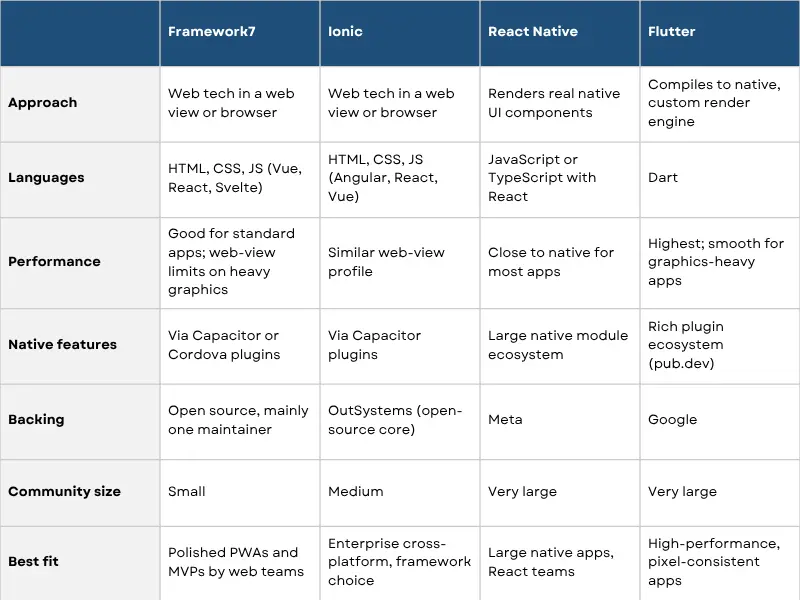
Since “cross-platform” covers two very different frameworks, here is the short version. Both are production-grade and power apps used by hundreds of millions of people, so the choice comes down to your team and your product rather than raw capability. Industry surveys put Flutter’s share of cross-platform developers in the high-forties percent, with React Native close behind in the mid-thirties.
Flutter (Dart): leads on rendering performance and visual consistency, draws its own UI, holds high frame rates on complex screens, and covers the most platforms from one codebase. App sizes run larger, and the Dart talent pool is smaller than JavaScript.
React Native (JavaScript): uses native UI components for a platform-true feel, has the larger package ecosystem, and draws on a much bigger hiring pool, since most developers already know JavaScript. It also shares skills and code with web React teams.
A rough guide: pick Flutter for design-heavy, animation-rich apps and when you want one team to ship everywhere; pick React Native when your team already lives in JavaScript or you want tight integration with an existing React web codebase. If you need help staffing either, you can hire Flutter developers or hire React Native developers.
Many teams combine these. A common pattern is a PWA or website for reach plus a cross-platform app for engaged users, with select pieces rebuilt in native only where the product truly needs it.
Is a PWA the same as an HTML5 mobile app?
A PWA is the modern version of it. It uses the same web languages, with added abilities like offline caching through service workers, home screen installation, and push notifications. Where older guides said “HTML5 app,” today they would say “PWA.”
Are cross-platform apps slower than native?
For most apps the difference is no longer noticeable. React Native’s New Architecture and Flutter’s Impeller engine closed most of the gap. Native still leads for graphics-heavy and hardware-intensive apps.
Do PWAs work on iPhone?
Yes, with limits. They install from Safari’s Share menu, work offline, and support push notifications on recent iOS versions outside the EU. They cannot use several hardware APIs such as Bluetooth and NFC, and background sync is restricted.
Which is cheaper, native or cross-platform?
Cross-platform is usually cheaper, because one codebase serves both platforms, often cutting cost by around 30 to 60 percent versus two native builds. A PWA is typically cheaper still.
Flutter or React Native, which should I pick?
Pick Flutter for design-heavy, animation-rich apps and broad platform coverage from one codebase. Pick React Native if your team already knows JavaScript or you want to share code with a React web app. Both are production-ready.
Can a PWA be listed in the app stores?
Yes. You can package a PWA with a tool like Capacitor and submit it to the App Store and Google Play if you want a store listing alongside the web version.
The right choice comes down to your goals, your budget, your audience, and how much your product leans on device hardware. If you want a second opinion before you commit, the team at Rlogical builds across PWA, native iOS and Android, Flutter, and React Native, and can recommend the approach that fits your product and budget. Get in touch to talk through your project.
Rahul Panchal is a visionary technology entrepreneur and the Founder & Managing Director of Rlogical Techsoft Pvt. Ltd. Passionate about the power of Artificial Intelligence, he focuses on helping businesses transform through AI-driven solutions, intelligent automation, and data-centric digital ecosystems. Alongside AI, his expertise spans scalable web and mobile platforms, Cloud, IoT, and modern enterprise technologies enabling organizations to innovate faster, optimize operations, and build future-ready digital products with real business impact.
Global insights on technology trends, best practices, and digital transformation strategies.

A proven track record of high-impact deliveries across industries and technologies
Share with us. We'll assess its feasibility, suggest the right tech stack, and share a clear cost & timeline.
Years of Experience
Projects
Countries
Engineers
Verified Client Reviews
Industry Served