

Share



Published on 22 November, 2019
| Last Updated on 29 June, 2026
Framework7 is a free, open-source framework for building mobile, desktop, and web apps with a native look and feel, using plain HTML, CSS, and JavaScript. The current major version is Framework7 9, and the project sits at roughly 18,000 stars on GitHub with steady weekly downloads on npm. If you remember Framework7 as a quick way to wrap a website in an iOS shell, a fair amount has changed.
This guide is built to help you make one decision: whether Framework7 is the right tool for your next app, or whether you are better served by Ionic, Flutter, or React Native. It covers what Framework7 is today, its updated strengths and weaknesses, how it compares to the main alternatives, what people actually build with it, and who should skip it.
Framework7 is a UI framework, not a full native runtime. You write your app with web technologies, and Framework7 gives you a large library of ready-made components (navigation bars, lists, cards, popups, sheets, tabs, side panels, form controls, pickers, and more) styled to match the platform your app runs on.
The current major version is Framework7 9, released under the MIT license. A few things define it today.
Two design themes ship in the box. The iOS theme mirrors Apple’s interface, and the Material theme follows Google’s Material You (Material 3) language, with dynamic color theming you can change at runtime from JavaScript. An older desktop theme called Aurora existed in earlier versions, but it was removed in version 8 when the team chose to focus the framework squarely on mobile interfaces.
You can use it with or without a JavaScript framework. Framework7 has a vanilla JavaScript core, plus official packages for Vue, React, and Svelte. Angular is no longer a first-party option. That flexibility means a Vue or React team can adopt it without switching their stack.
It targets every common output. With a browser you get a web app or a progressive web app. Paired with Capacitor or Apache Cordova, the same codebase becomes an installable iOS or Android app. Paired with Electron or a similar shell, it can run as a desktop app. Framework7 also bundles Swiper, the widely used touch slider built by the same author, and DOM7, a small jQuery-style helper for DOM work.
In short, Framework7 today is a mobile-first UI layer for web technology apps, with some of the most convincing iOS and Material components you can get without writing native code.
If you are returning to Framework7 after a long gap, here is what is different from the older tutorials still floating around.
The tooling moved on. Old guides told you to install through Bower and drop in CDN script tags for a fixed version. Bower is long dead. Today you install through npm and build with a modern bundler such as Vite or Rollup. The old FastClick workaround for touch delay is gone too, since current mobile browsers handle that natively.
Material You arrived. Version 8 brought the biggest visual change in years, rebuilding the Material theme around Material 3, moving color definitions into JavaScript, and adding a setColorTheme method so you can recolor an app on the fly.
The router and components matured. Earlier versions used a template engine called Template7. That was removed in favor of plain JavaScript template literals and router components, which can also be written with JSX. There is a built-in state management solution as well, so small and mid-sized apps often do not need an external store.
Native deployment is officially supported through Capacitor. Capacitor, which is made by the Ionic team, is now a first-class way to package a Framework7 app for the app stores, alongside Cordova.
The “iOS and Android only” line is outdated. Older write-ups, including earlier versions of this article, said Framework7 only supported iOS and Android. That is no longer accurate. Web, PWA, and desktop are all valid targets.
It costs nothing. MIT licensed, no tiers, no seat costs, and no paid plugins gating core features.
The component library is large and well-built. This is Framework7’s strongest selling point. The breadth and finish of its prebuilt UI, especially the iOS theme, is hard to match among web-based frameworks. You get a native-feeling app shell with very little custom styling.
It fits web teams immediately. If your developers know HTML, CSS, and JavaScript, they can be productive in days, not weeks. No new language and no native build knowledge are required to start.
It is framework flexible. Use it as vanilla JavaScript, or with Vue, React, or Svelte. You are not locked into one ecosystem.
It is a strong choice for prototypes and PWAs. You can stand up a working, native-looking prototype quickly, ship it as a Progressive Web App, and later wrap it for the stores with Capacitor when you need to.
It bundles useful pieces. Swiper for sliders and carousels, DOM7 for DOM work, a router, and state management come together, so you are not assembling everything yourself.
The documentation and demos are thorough. The official docs and the Kitchen Sink demo app let you see and copy every component in action.
It runs in a web view, with the limits that implies. Like Ionic, a Framework7 app packaged for mobile renders inside a web view. For most content, form, and list-driven apps that is fine. For graphics-heavy work such as games, complex animation, or very long, fast-scrolling data views, a native or Flutter app will feel smoother.
The community is small. This is the trade-off you have to weigh seriously. Compared with React Native or Flutter, there are far fewer tutorials, Stack Overflow answers, third-party plugins, and experienced developers available for hire. When you hit an unusual problem, you may be on your own.
It depends heavily on one maintainer. Framework7 has largely been the work of a single developer, Vladimir Kharlampidi, who also created Swiper. The output has been impressive and consistent, but a one-person project carries real continuity risk for a product you plan to support for years.
Native device features are not built in. Camera, geolocation, push notifications, secure storage, and similar capabilities come from Capacitor or Cordova plugins, not from Framework7 itself. You are relying on that separate plugin ecosystem.
The design is opinionated. Framework7 is built around faithful iOS and Material looks. That is a strength if you want exactly that, and a constraint if you want a heavily custom brand UI that ignores platform conventions.
No first-party Angular support. If your team is committed to Angular, Ionic is the more natural fit.
These four often come up together, but they are not the same kind of tool. Framework7 and Ionic are web-technology UI frameworks that render in a web view. React Native renders to real native components. Flutter compiles to native code and draws its own UI with its own engine. That core difference drives most of the trade-offs.
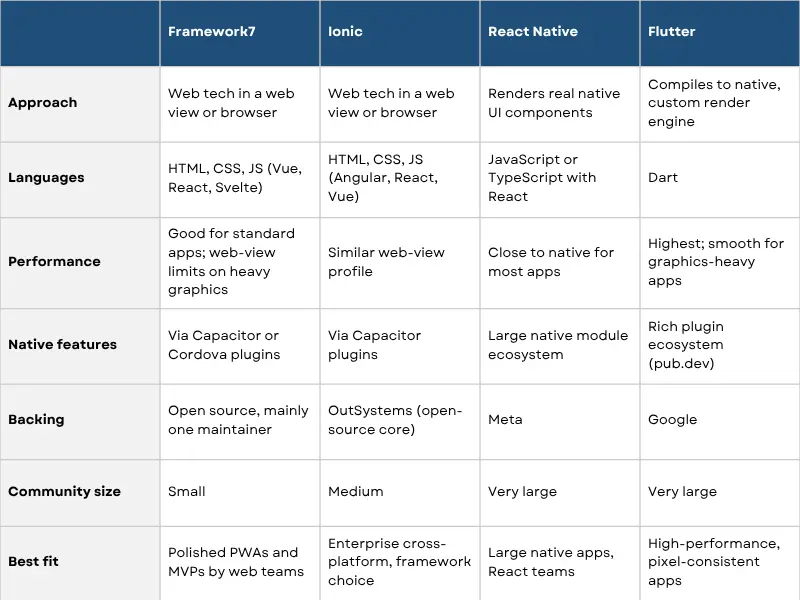
These two are the closest comparison, since both build native-looking apps from web code. Ionic supports Angular, React, and Vue, has a much larger community, and is backed by OutSystems, which acquired Ionic in 2022. Worth noting: Ionic has wound down its paid cloud products, such as Appflow, although Ionic Framework and Capacitor remain free, open source, and actively maintained. Framework7 counters with arguably more refined iOS components out of the box and a lighter, simpler feel. Pick Ionic for a bigger ecosystem, framework choice, and enterprise comfort. Pick Framework7 when the component finishes and a small, focused codebase matters more than community size.
React Native is a different category. It renders actual native UI elements rather than web views, is backed by Meta, and has an enormous community, well over 100,000 GitHub stars and millions of weekly downloads. For complex, long-lived native apps, it usually performs better and is far easier to staff. The cost is a steeper setup, a native build toolchain, and more moving parts. Framework7 wins on web reuse, PWA support, and how quickly a web developer can get going. React Native wins on native performance, ecosystem, and hiring.
Flutter, from Google, compiles to native code and renders through its own engine, which gives it the smoothest performance of the group and a consistent look on every device. In recent cross-platform developer surveys it has led the field, ahead of React Native, with Ionic and similar web-based tools further back. The trade-offs are learning Dart, larger app sizes, and stepping outside the web ecosystem. Choose Flutter when raw performance and visual consistency are the priority. Choose Framework7 when you want to reuse web skills, ship a PWA, and avoid a new language.
Framework7 fits a clear band of projects well.
Progressive Web Apps and web-first products that also want an app-store presence later. You ship the PWA now and wrap it with Capacitor when the time comes.
MVPs and prototypes that need to look finished fast. The native-looking components let a small team demo something convincing early.
Content and utility apps: news readers, catalogs, booking and listing apps, simple e-commerce front ends, event guides, and internal business tools.
Dashboards and admin-style mobile apps where clean lists, forms, and navigation matter more than heavy graphics.
Apps built by web teams that want a native feel without learning Swift, Kotlin, or Dart.
It is a weaker fit for mobile games, AR or heavy animation, and apps where every millisecond of scroll and gesture performance is critical.
Consider Framework7 if you:
Look elsewhere if you:
Framework7 is a mature, free, and unusually well-finished UI framework for building mobile, web, and desktop apps with web technology. Its native-looking components and easy on-ramp for web developers remain its biggest strengths. Its small community and reliance on a single maintainer remain its biggest risks.
If you are a web-focused team building a PWA, an MVP, or a clean content-driven app, Framework7 can get you to a professional result quickly and at no cost. If you are building something graphically intensive, staffing a large long-term project, or you need enterprise backing, Flutter, React Native, or Ionic are the safer calls.
Still weighing your options? Rlogical’s team works across hybrid app development, Flutter, and React Native. Tell us about your project and we will help you pick the right stack and build it. Get in touch.
Yes. The latest major release is Framework7 9, and the project continues to receive regular updates on GitHub.
Yes. It is open source under the MIT license, with no paid tiers or license fees.
Yes. You build with web technologies and package the app for iOS and Android using Capacitor or Apache Cordova. You can also ship the same code as a web app or PWA, and as a desktop app with a shell like Electron.
Yes. Alongside its vanilla JavaScript core, Framework7 has official packages for Vue, React, and Svelte. Angular is not supported as a first-party option.
Neither is universally better. Framework7 tends to have more refined iOS components and a lighter feel, while Ionic has a larger community, supports Angular, React, and Vue, and is backed by OutSystems. Your choice depends on team skills, the platforms you need, and how much community support matters.
Not really. Because mobile builds run in a web view, graphics-heavy apps and games perform better with Flutter or native development.
Jatin Panchal is an innovation-driven entrepreneur, and the Founder & Managing Director of Rlogical Techsoft Pvt. Ltd. He believes modern leadership is driven by innovation, adaptability, and the transformative power of Artificial Intelligence. He focuses on helping businesses accelerate digital growth through AI-powered solutions, intelligent automation, Cloud, blockchain, IoT, and scalable enterprise technologies. With a strong strategic vision and future-focused mindset, he is passionate about building technology ecosystems that improve efficiency, drive innovation, and create long-term business value for global clients.
Global insights on technology trends, best practices, and digital transformation strategies.
A proven track record of high-impact deliveries across industries and technologies
Share with us. We'll assess its feasibility, suggest the right tech stack, and share a clear cost & timeline.
Years of Experience
Projects
Countries
Engineers
Verified Client Reviews
Industry Served